
This guide provides instructions for migrating existing chan_sip trunks to chan_pjsip on an E-MetroTel UCX Cloud system.
Why migrate to PJSIP
PJSIP is the next-generation SIP stack offering improved performance, better NAT handling, and ongoing feature support. Migrating your trunks ensures compatibility with future updates and enhancements.
Update Port on Partner Portal
UCX Administration
- chan_sip uses port 5960 (UDP) – configured under SIP Settings
- pjsip uses port 5961 (UDP) – configured under PJSIP Settings
STEP 1 – Update SIP Port
- Login to the Partner Portal and navigate to Cloud Services -> SIP Trunk page.
- Find the relevant trunk and modify the SIP port to 5961.
- Note that the change can take up to 5 minutes to take effect.
Trunk Migration
STEP 2 – Configure PJSIP Settings
- Login to UCX Administration
- Navigate to PBX → PBX Configuration → PJSIP Settings page.
- Under SIP (PJSIP) Settings, set SIP (PJSIP) Support to Enabled.

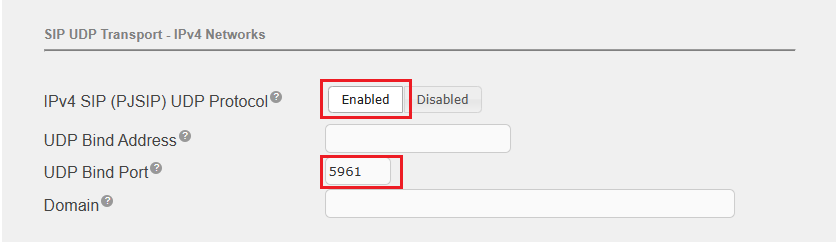
- Under SIP UDP Transport – IPv4 Networks:
- Set IPv4 SIP (PJSIP) UDP Protocol to Enabled.
- Set UDP Bind Port to 5961
- Click Save.
- Restart Telephone Service for the changes to take effect.

STEP 3 – Add PJSIP Trunk
- Navigate to PBX → PBX Configuration → Trunks page.
- Click Add Trunk.
- Select Add SIP Trunk (chan_pjsip).
- Configure the fields as follows.
- Trunk Name – Enter a descriptive name with no spaces.
- Outbound CallerID – Enter CallerID for calls placed out this trunk. (e.g. “E-MetroTel” <13454446666>)
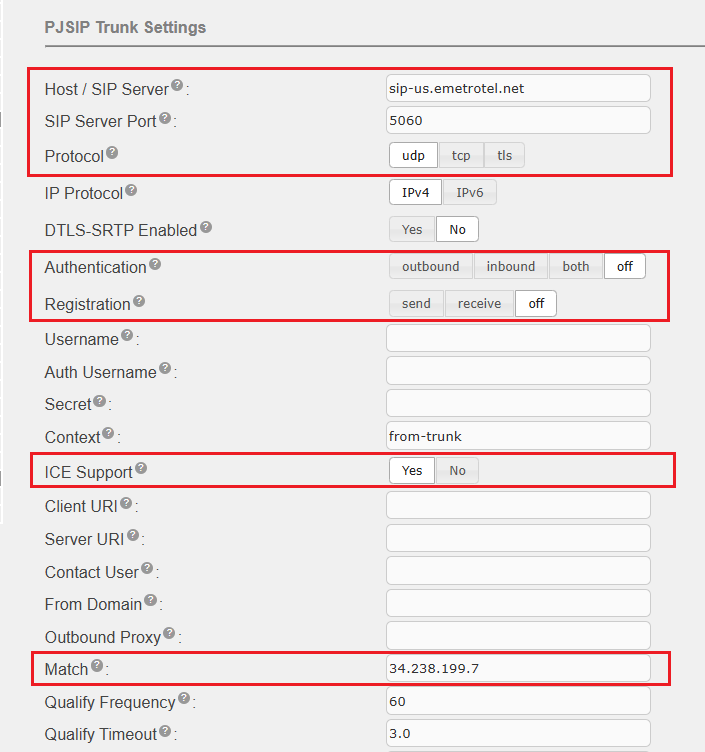
- Host / SIP Server – Copy from your existing chan_sip trunk. (e.g. sip-us.emetrotel.net)
- SIP Server Port – 5060 (must use 5060)
- Protocol – udp
- Authentication – OFF
- Registration – OFF
- Context – from-trunk
- ICE Support – Yes
- Match – The IP address of the SIP server. (e.g. 34.238.199.7)
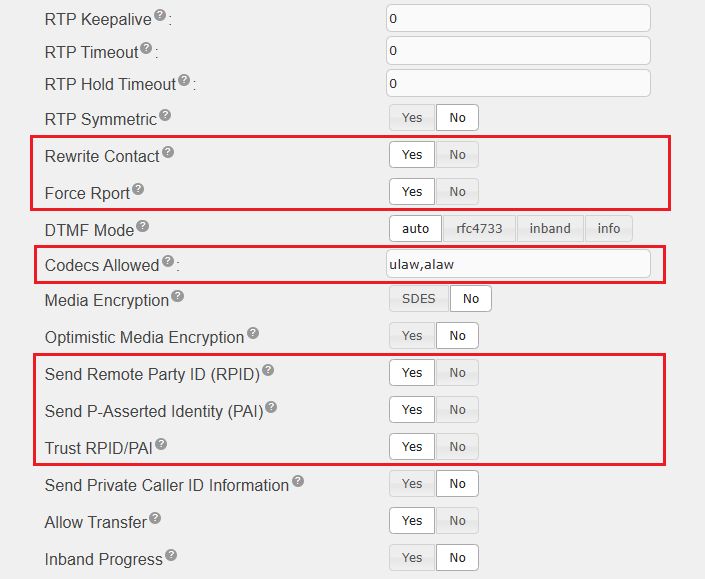
- Rewrite Contact – Yes
- Force Rport – Yes
- Codecs Allowed – ulaw,alaw
- Send Remote Party ID (RPID) – Yes
- Send P-Asserted Identity (PAI) – Yes
- Trust RPID/PAI – Yes
- The rest of the fields, leave it at their default values.
- Click Submit Changes and Apply Config.
STEP 4 – Test new trunk
- Make a few test calls through the new chan_pjsip trunk.
- Verify both inbound and outbound audio paths.
- Verify calls from or to a cell phone.
Troubleshooting
If external calls are experiencing one-way or no audio after migration, E-MetroTel may need to enable Media Relay for that specific SIP trunk.
Please open a helpdesk ticket to report the issue.
STEP 5 – Remove old trunk
Once it is confirmed the new pjsip trunk is working, perform the last step:
- Disable or Delete the old chan_sip trunk.
