
New Firmware for Galaxy Analog Gateway Cards
E-MetroTel has introduced a new firmware load that is common for all the Analog Gateway cards: Galaxy FXS 16-port, Galaxy FXS-8, and Galaxy FXO-8 cards, bringing consistency to the user interface and operation across all these devices.
The Analog Gateway cards are plug-in cards designed for use in the Galaxy Express and Galaxy Expand platforms.
Key changes introduced
- Updates to the operating system and other lower layer software have been included
- The login screen has changed
- Multiple account types and Account Logout button
- Automatic logout after inactivity
- Simplification to firmware updates – does not require factory reset after updating
- The introduction of Profiles to simplify the configuration of SIP account related details to use for different applications
- FXS cards now support XSTIM
Differentiating between original and new firmware
Cards loaded with the new firmware can be easily distinguished from those loaded with old firmware once you connect to the Web User Interface because of the different login screens.
Log in with New Firmware
The following login screen is presented when the card is loaded with the new firmware:

If this screen is presented as you attempt to connect and configure any analog cards, then follow the documentation under Galaxy Gateway Cards – Galaxy Analog Card.
Log in with Original Firmware
The following log in screen is presented when the card is loaded with the old firmware:
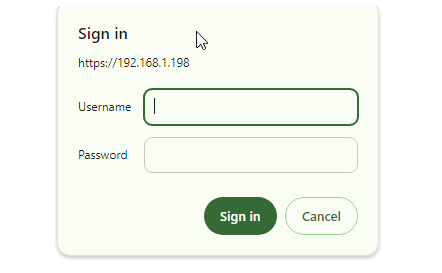
If this screen is presented as you attempt to connect and configure any analog cards, contact E-MetroTel Support for additional details.
FXO 8-port Card
The FXO 8-port Card provides standard connection to analog lines typically from a PSTN service provider.
Side View

Front Panel

| Interface | Description |
|---|---|
| 1-8 | Standard analog interface connection to a service provider PSTN network (or similar) Type: RJ-11 Note: This card uses DADHI to communicate with a Galaxy Expand Server Card, so it must be in the same Galaxy Expand chassis as the server card. |
| Indicator | Description |
| 1-8 | Flashing RED: Indicates an FXO port with no trunk connection. Indicator turns off when connected to a trunk. |
FXS 16-port Card
The FXS 16-port Card provides standard connection via an amphenol interface to analog telephones or similar devices.
Side View

Front Panel

| Interface | Description |
|---|---|
| Amphenol | Connection to Analog Telephone Sets Default IP Address: DHCP (backplane connection) Type: RJ-21 |
| Indicator | Description |
| PWR: RUN: | Green: Indicates the card processes are running. Red: Indicates an operational failure |
