Overview
Deliver the right message at the right time with SMS Assist, allowing SMS messages to be sent directly from your call flow. Callers can request text messages directly from an IVR, or through queues using the IVR breakout option.
SMS Assist enables administrators to configure short text messages that are automatically sent to the caller’s Caller ID number based on inbound call flow logic or user interaction.
An SMS message configured with SMS Assist can be used as a destination for inbound calls with the option to:
Continue the call after the message is sent
Return to the IVR
Terminate the call after the message is delivered
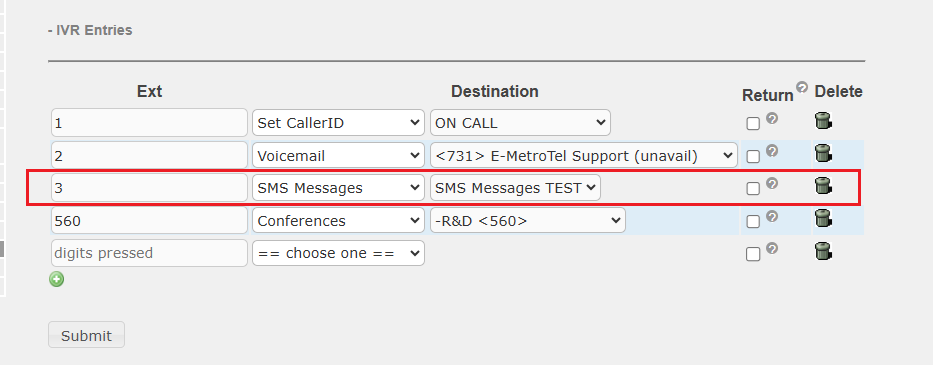
SMS Assist can also be associated with IVR menu selections or queue breakout options, providing customers with a seamless transition from voice to messaging support.
To send SMS messages, your UCX system must have at least one DID number enabled for SMS messaging. The maximum length of an SMS message is 160 characters.
Create SMS Message
To access the SMS Assist page, perform the following steps:
- From the PBX tab, select PBX Configuration
- From the left side column, under Applications, select SMS Assist
- Select Add SMS Message
- Enter the required fields and click Submit.
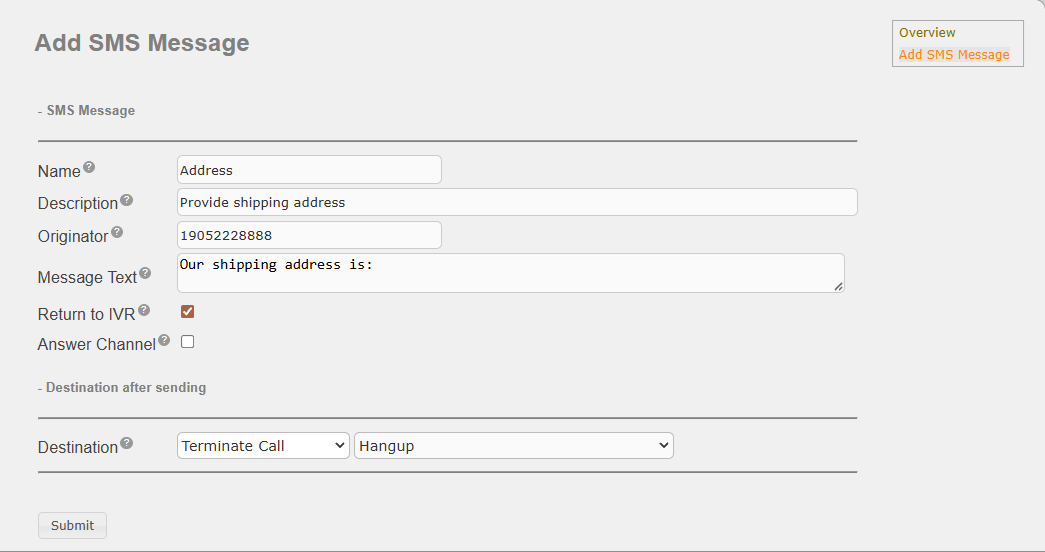
| Field | Description |
|---|---|
| Name | The name cannot be blank. It can contain only letters, numbers and spaces. |
| Description | The description cannot be blank. It can contain only alpha-numeric characters. |
| Originator | The originator’s phone number must be an 11 digit DID number associated with the serial number of the UCX system that thas the option to send SMS messages enabled. |
| Message Text | The message cannot be blank. It can contain only letters, numbers, spaces and a few special characters (@, $, !, &, +, -). Maximum allowed number of characters is 160. |
| Return to IVR | If the request to send SMS message came from an IVR, then selecting this checkbox will return the call back to the last IVR in the call chain. The destination field below will be ignored. |
| Answer Channel | When unchecked, the SMS message will be sent without answering the channel. When checked, the channel is answered followed by a 1 second delay. |
| Destination | Destination to send the call after the SMS has been sent. |
Add SMS Message to the Call Flow
SMS messages can be added as a destination in any inbound call flow. The example below shows the SMS message as a destination for an IVR.