Administration

Fax API for 3rd Party Applications

Third Party applications are able to send, receive, and monitor fax transmissions to the UCX Virtual Fax capability via the UCX Fax API for 3rd Party Clients. Access to the API is enabled via license, which must be applied via the System / Licenses page. It relies on one or more Virtual Fax extensions to have been created on the UCX using the steps provided in the Virtual Fax documentation page.

When using the UCX Fax API for 3rd Party Clients, it is highly recommended that individual Virtual Fax extension be created for each DID that will be dedicated to fax. This will require one universal extension license for each Virtual Fax, as Virtual Fax extensions are configured as IAX2 extensions.

The UCX Fax API for 3rd Party Clients allows 3rd party client applications to implement their own user interface for capabilities provided by the Virtual Fax feature available on UCX systems.

This document describes the REST API used to interact with the UCX Virtual Fax system.

Request Authentication

The Fax API uses HTTP bearer authentication for all requests. The bearer token is retrieved from the UCX using the Token method and client credentials (Client ID and Secret). The Token method uses HTTP Basic Authentication. The Client ID is used as the username and the Secret is used as the password. 

The client credentials are provided on the System – Licenses page in the UCX management GUI (provided the system has a license for the external Fax API).
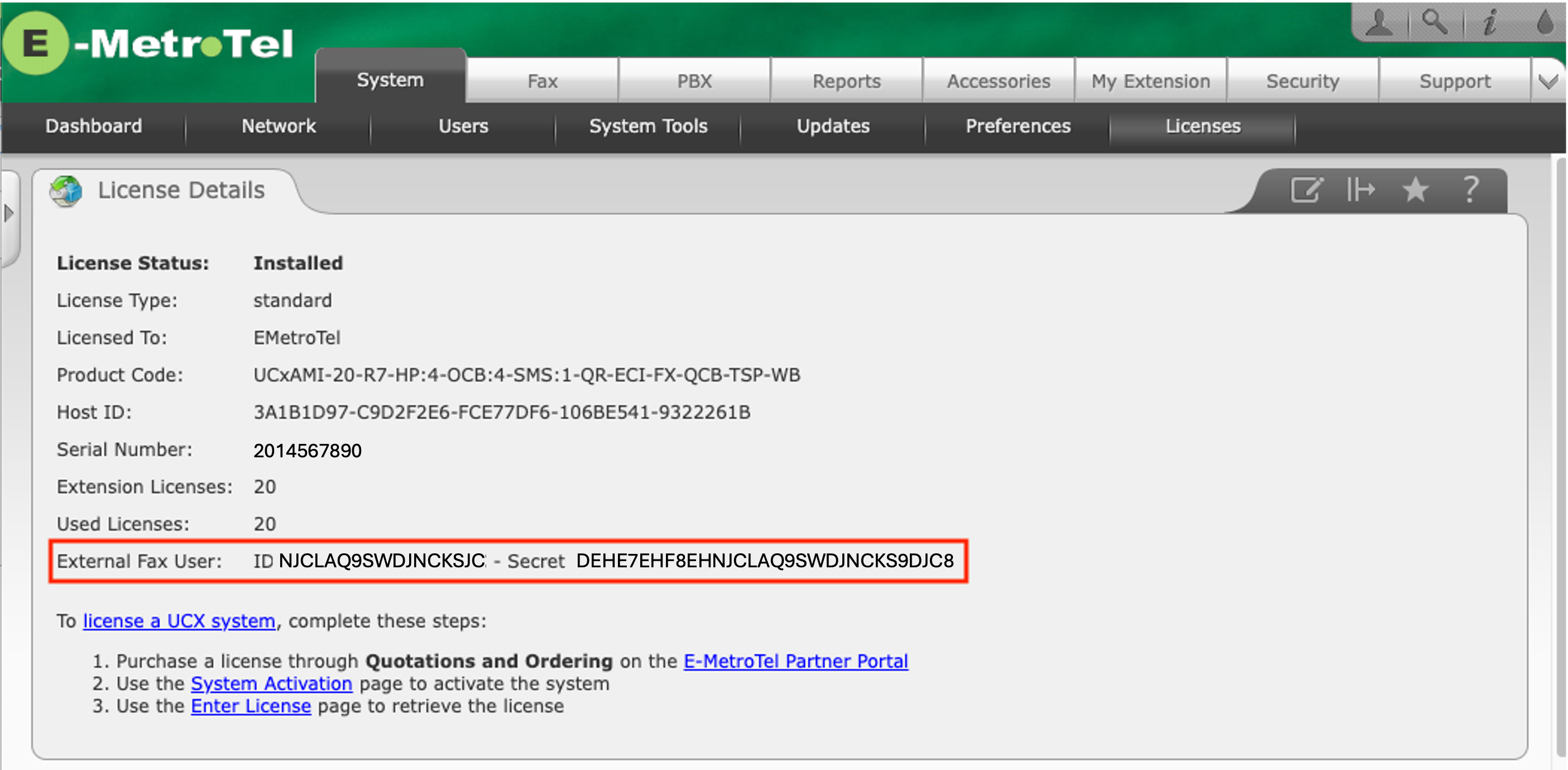
The bearer token is valid for the entire validity period of the external Fax API license. Hence, the 3rd party application needs to acquire a new token only when the external Fax API license is initially added (or after the license is removed or expires and is subsequently renewed).

Authentication Flow

  1. Retrieve a bearer token using the Token method and the Client ID / Secret.
  2. Include the returned bearer token in the Authorization header for all subsequent requests.

Authorization Header Example:

Authorization: Bearer <token>

Request Format

The Fax API uses GET requests for simple methods such as a request to get a list of virtual faxes or to get information about send requests. For GET requests:

  • Parameters are passed as URL-encoded query strings.

The Fax API uses PUT requests for methods that can be used to modify the status of send requests. For PUT requests:

  • Parameters are passed as JSON encoded data using the UTF-8 encoding. The header “Content-Type: application/json” should be included in the request.

The Fax API uses POST requests for methods that include file attachments. For POST requests:

  • Parameters and the attachment(s) are passed in the form of multipart MIME data.

Response Format

All Fax API methods provide responses in the form of JSON-encoded data using the UTF-8 encoding. The 3rd party application should include an “Accept: application/json” header in their requests to indicate the client can handle JSON responses.

Error Reporting

Standard HTTP status codes are used to report errors due to which requests cannot be processed by appropriate REST API handlers. Examples of such errors would be:

  • 400 Bad Request: Invalid parameters or missing fields.
  • 401 Unauthorized: Authentication failed (invalid/missing token).
  • 404 Not Found: Invalid API endpoint or method.
  • 500 Internal Server Error: Server-side processing failure.

If the request reaches the appropriate API handler, errors are reported through JSON-encoded data with two items – result and message. The following data is an example of an error response:

Example error response:

{"result":"Error","message":"Authentication failed"}

Overview

MethodDescription
TokenRetrieve the bearer token required for all other API methods
FaxListGet a list of virtual faxes (virtual fax machines configured on the system)
FaxUsageGet information about the current usage of virtual faxes
FileSendSend a fax file (attachment) using a specific virtual fax (from the fax list) to a single destination phone number. A job ID is generated for an accepted request.
JobStatusRequest the current status of a send request using its job ID
JobCancelCancel an outstanding send request using its job ID
ActiveJobsGet a list of active fax jobs (i.e., send requests or receive requests in progress)
RecordCountGet the number of fax records stored in the database (either sent or received)
RecordsGetGet fax job records from the database (either sent or received)
RecordDeleteRequest to delete a fax record and the associated fax file using its job ID
FileDownloadDownload a fax file associated with a job ID

Method: Token

Use this method to retrieve the bearer token required for all other API methods.

Resource: /restv1/efax/token
Type: GET

Parameters:

none

Authentication:

See Request Authentication above. The Client ID and Secret are supplied using HTTP Basic Authentication (Client ID = username, Secret = password) and are not passed as request parameters.

Response:

When the request is accepted, the response is a JSON object with the bearer token. The response includes the following items:

  • result Value “Success” indicates the request was successfully processed.
  • token Bearer token that must be used for all other API methods.

Example request:

GET /restv1/efax/token

Example response:

{"result":"Success","token":"1f0ef7d3a547ce0dd5ed5f07ad65bd65"}

Method: FaxList

Use this method to retrieve a list of virtual faxes that can be used to send/receive faxes.

Resource: /restv1/efax/faxlist
Type: GET

Parameters:

none

Response:

When the request is accepted, the response is a JSON object with data about all available faxes (virtual faxes configured on the UCX system). The response includes the following items:

  • result Value “Success” indicates the request was successfully processed.
  • count Number of virtual faxes returned.
  • faxes Array of information about available virtual faxes.

For each virtual fax, the following items are provided:
id, extension, name, cidnumber, cidname.

Example request:

GET /restv1/efax/faxlist

Example response:

{“result”:”Success”,”count”:2,”faxes”:[
{“id”:”1″,”extension”:”599″,”name”:”Sales”,”cidnumber”:”14695551111″,”cidname”:”EMT Sales”},
{“id”:”2″,”extension”:”598″,”name”:”Support”,”cidnumber”:”14695551112″,”cidname”:”EMT Support”}
]}

Method: FaxUsage

Use this method to retrieve information about the current usage of virtual fax(es).

Resource: /restv1/efax/faxusage
Type: GET

Parameters:

  • fax_id (Optional)
    The fax ID of the virtual fax for which to return usage information. When no ID is specified, usage information for all virtual faxes is returned.

Response:

When the request is accepted, the response is a JSON object with usage information about the virtual fax (when an ID is specified) or for all available faxes. The response includes the following items:

  • result Value “Success” indicates the request was successfully processed.
  • count Number of virtual faxes configured on the UCX system.
  • faxes Array of information about the usage of virtual faxes.

For each virtual fax, the following items are provided:
id, state, jobCount.

Example request:

GET /restv1/efax/faxusage

Example response:

{”result”:”Success”,”count”:2,”faxes”:[ {”id”:”1″,”state”:”Waiting for modem to come ready”,”jobCount”:0}, {”id”:”2″,”state”:”Running and idle”,”jobCount”:1} ]}

Method: FileSend

Use this method to generate a request to send a fax file.

Resource: /restv1/efax/filesend
Type: POST

Parameters:

  • fax_id (Required)
    ID of the virtual fax to be used for the send request (this ID is returned by the FaxList method)
  • destination (Required)
    The destination phone number (the dialing string to use to contact the remote fax machine)
  • attachment (Required)
    The file to be sent. Supported formats include POSTSCRIPT, TIFF, PDF, ASCII text, Troff output and Silicon Graphics format images.

Response:

When a request is accepted, the response is a JSON object with data about the request. The response includes the following items:

  • result Value “Success” indicates the request was successfully processed.
  • device Name of the TTY device that will be used for the fax transmission.
  • destination Destination phone number.
  • job_id Job ID assigned to the fax transmission task. This job ID can be used to query the current status of the request using the JobStatus method.

Example request:

POST /restv1/efax/filesend (fax_id=2, destination=14695550101, attachment=test.pdf)

Example response:

{”result”:”Success”,”device”:”ttyIAX2″,”destination”:”14695550101″,”job_id”:”TX82″}

Method: JobStatus

Use this method to retrieve the current status of a virtual fax job. This method can be used to query the status of jobs related to both transmission and reception of faxes.

Resource: /restv1/efax/jobstatus
Type: GET

Parameters:

  • job_id (Required)
    ID of the virtual fax job

Response:

When the request is accepted, the response is a JSON object with data about the job with the specified ID. The response includes the following items:

  • result Value “Success” indicates the request was successfully processed.
  • status Array of information items about the request ID.

The following items are provided in the status array:
time (UTC timestamp), destination, state, sent_pages, total_pages, attempts, max_retries, time_to_send, duration, status_text.

Example request:

GET /restv1/efax/jobstatus?job_id=TX82

Example response:

{”result”:”Success”,”status”:{”time”:”2026-04-20 20:59:03″,”destination”:”14695550101″,”state”:”Sleeping”,”sent_pages”:”0″,”total_pages”:”1″,”attempts”:”3″,”max_retries”:”12″,”time_to_send”:”21:01″,”status_text”:”Busy signal detected”}}

Method: JobCancel

Use this method to cancel an outstanding request to send a fax. Jobs associated with the reception of faxes cannot be cancelled.

Resource: /restv1/efax/jobcancel
Type: PUT

Parameters:

  • job_id (Required)
    ID of the job to be cancelled

Response:

When a request is accepted, the response is a JSON object with the result of the cancel request.

  • result Value “Success” indicates the request was successfully processed.
  • status Array of text line(s) describing the result.

Example request:

PUT /restv1/efax/jobcancel (job_id = TX82)

Example response:

{“result”:”Success”,”status”:”Job 82 removed.”}

Method: ActiveJobs

Use this method to get information about active send or receive fax jobs.

Resource: /restv1/efax/activejobs
Type: GET

Parameters:

  • type (Required)
    The type of jobs to retrieve (either TX or RX)

Response:

When the request is accepted, the response is a JSON object with an array of information about active fax jobs.

  • result Value “Success” indicates the request was successfully processed.
  • count Number of active fax jobs returned.
  • list Array of active fax jobs.

Note: Only jobs started via the FileSend API method (the requestor = API) are listed in TX results.

The following fields are returned in each job:
jobid, time (UTC timestamp), time_to_send, destination, state, sent_pages, total_pages, ndials, totdials, maxdials, attempts, max_attempts, status_text, requestor and modem.

Example request:

GET /restv1/efax/activejobs?type=TX

Example response:

{”result”:”Success”,”count”:1,”list”:[ {”jobid”:”TX83″,”time”:1776761122,”destination”:”14695550101″,”state”:”Active”,”sent_pages”:”0″,”total_pages”:”1″,”attempts”:”1″,”status_text”:”Dialing”,”modem”:”ttyIAX2″} ]}

Method: RecordCount

Use this method to get the number of completed fax jobs stored in the database.

Resource: /restv1/efax/recordcount
Type: GET

Parameters:

  • type (Required)
    The type of jobs to query (either TX or RX)

Response:

When a request is accepted, the response is a JSON object with the number of completed fax jobs stored in the database.

  • result Value “Success” indicates the request was successfully processed.
  • count Number of completed fax jobs.

Note: Only jobs started via the FileSend API method (the requestor = API) are counted for TX queries.

Example request:

GET /restv1/efax/recordcount?type=RX

Example response:

{”result”:”Success”,”count”:12}

Method: RecordsGet

Use this method to get data for completed fax jobs.

Resource: /restv1/efax/recordsget
Type: GET

Parameters:

  • type (Required)
    The type of jobs to query (either TX or RX)
  • limit (Optional)
    The maximum number of records to be returned
  • offset (Optional)
    The number of records to be skipped. The offset parameter is valid only when limit is specified.

Response:

When a request is accepted, the response is a JSON object with the count of completed fax requests returned in the records array followed by the array of records. The response includes the following items:

  • result Value “Success” indicates the request was processed successfully.
  • count Number of fax records returned in the array.
  • records Array with data of completed fax jobs.

Note: Only jobs started via the FileSend API method (the requestor = API) are included in the response to the TX query. Send fax jobs from other applications are not included.

The following fields are returned in each record:
jobid, time (UTC timestamp), phone_number, cid_name, station_id, state, sent_pages, total_pages, attempts, duration, status_text, requestor and modem.

Example request:

GET /restv1/efax/recordsget?type=RX&limit=2&offset=0

Example response:

{”result”:”Success”,”count”:2,”records”:[ {”jobid”:”RX34″,”time”:1774359807,”phone_number”:”2142454571″,”cid_name”:”2142454571″,”station_id”:”Sales”,”state”:”Done”,”sent_pages”:”1″,”total_pages”:”1″,”attempts”:”0″,”duration”:”18″,”status_text”:””,”requestor”:””,”modem”:”ttyIAX2″}, {”jobid”:”RX44″,”time”:1776285776,”phone_number”:”6472769534″,”cid_name”:”MV”,”station_id”:”Support”,”state”:”Done”,”sent_pages”:”1″,”total_pages”:”1″,”attempts”:”0″,”duration”:”13″,”status_text”:””,”requestor”:””,”modem”:”ttyIAX2″} ]}

Method: RecordDelete

Use this method to delete the record for the specified job ID and the associated fax file.

Resource: /restv1/efax/recorddelete
Type: PUT

Parameters:

  • job_id (Required)
    ID of the job to be deleted

Response:

When a request is accepted, the response is a JSON object with the result of the delete request.

  • result Value “Success” indicates the request was successfully processed.
  • status Array of text line(s) describing the result.

Example request:

PUT /restv1/efax/recorddelete (job_id = TX69)

Example response:

{”result”:”Success”,”status”:”ID TX69 deleted”}

Method: FileDownload

Use this method to download the file associated with the specified job ID.

Resource: /restv1/efax/filedownload
Type: GET

Parameters:

  • job_id (Required)
    ID of the job associated with the file

Response:

When the request is successful, the file is downloaded. If the request fails, an error response is returned.

  • result – Error indicator (if applicable)
  • status – Description of the error

Example request:

GET /restv1/efax/filedownload?job_id=TX75

Example responses:

HTTP/1.1 200 OK + downloaded file TX75.pdf
HTTP/1.1 404 Not Found + {”result”:”Error”,”message”:”Job not found”}

Contents
