
Failed to load fax list
Symptom
When trying to access the Fax feature from Infinity Web Client or Infinity 3065, an error message is seen: “Failed to load fax list“.
Problem
HTTPS protocol is used to retrieve call log, fax information, etc. from the UCX. If port 443 is not forwarded to the UCX, a remote device will not be able to access these resources.
Solution
Update port forwarding rules to have port 443 forwarded to the IP address of UCX.
Send a Fax error
Symptom
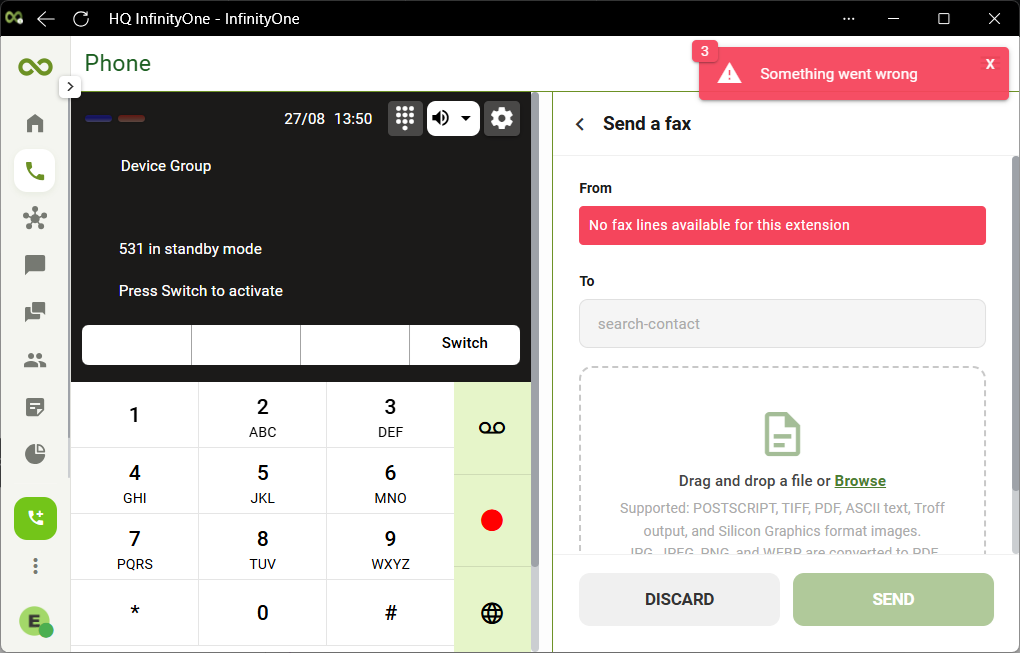
Error messages appear when clicking on Send a Fax.
Problem
The extension is part of a device group and is currently in standby mode.
Solution
Click the Switch softkey to activate the extension.
Send button does not work
Symptom
Nothing happens when clicking or selecting the Send button.
Problem
The Send button is not active. This button will only become active when all the required fields are entered.
Solution
A common problem is forgetting to hit ENTER or clicking to select the contact when entering the fax number to send to.
Verify that all the fields are the form are filled in and check that the Send button changes to active.
FAX not sent
Go to the FAX tab to view the history of faxes sent. It will show the status of the faxes sent.
- If a fax transmission is unsuccessful, the UCX system will automatically retry delivery based on the configured retry policy.
- If the maximum retry attempts are reached, the fax status will be marked as Failed and the fax must be manually resent.
For more details refer to the respective user guides:
FAX not received
If status shows the fax has been successfully sent but the destination did not receive the fax:
- Verify the correct number has been entered.
- If the destination is also a virtual fax, check if it ended up in the spam or junk folder.
- The destination inbox is full or the destination fax memory is full.
