
Overview
PresenceThe Presence feature allows users to see each others Status using a coloured circle dot. The following color scheme is used:
The status shown is based on a combination of your chat, phone and video statuses. Status MessageYou can also create your own custom status message. Click-to-CallThe Click-to-Call feature allows users to call each other with a simple click on the status icon. | 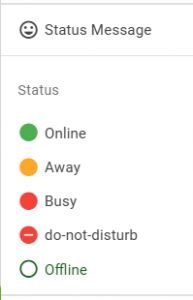 |
Click-to-Call
- When you click on the Phone Status icon associated with another user, InfinityOne will open a window confirming that you wish to call that user.
- If that account has more than one extension associated with it, you may select the desired extension from a drop-down list.
- You may also select the extension that you wish to dial from (if you have more than one configured in your Phone settings).
- The call will be set up automatically when you click Ok, or you may Cancel.

Chat channel
If a user does not have a Phone Status icon, then clicking the status icon will open the direct Chat channel with that user.
Clicking on the Avatar will also open up the chat channel with that user.
