
Overview
AI Assist extends UCX voice services within InfinityOne by adding real-time transcription, rolling sentiment analysis, and automated post-call summarization. The feature is fully UCX-integrated and operates within the existing call control and recording framework without altering telephony behavior.
During active calls, audio is securely streamed from UCX to AI processing services hosted on E-MetroTel cloud server infrastructure. Processing occurs in approximately five-second intervals to optimize responsiveness and conversational flow. Transcription and sentiment data are returned to InfinityOne for presentation.
If a call is handled on the Infinity Web Client, transcription and sentiment are displayed in real time within the active call interface.
If a call is answered on an XSTIM physical phone or the Infinity 3065 softphone:
• Real-time transcription and sentiment processing still occurs
• The live transcript is not visible on those devices
• The call may be moved to the Infinity Web Client to view transcription in real time
• After call completion, transcript and summary are retrievable through the Infinity Web Client
AI Assist uses transient audio processing. Audio is not retained within the AI processing infrastructure. Transcript, sentiment data, and summary are stored within UCX and remain within the UCX security and access control domain.
Call recording, if enabled, continues to follow existing UCX recording rules and storage policies. AI Assist does not modify routing, recording logic, or telephony behavior.
Deployment Considerations
Cloud Processing Requirement
AI Assist requires active outbound internet connectivity. When a licensed user’s call is connected, audio streaming to the E-MetroTel AI infrastructure begins automatically.
If internet connectivity is unavailable or interrupted:
• Transcription will not be generated
• Sentiment analysis will not occur
• Post-call summary will not be created
Core UCX call handling, including recording if enabled, remains unaffected.
AI Assist applies only to calls placed or received after licensing and connectivity are active. Previously completed calls are not retroactively processed.
Network and Firewall Requirements
UCX must have secure outbound connectivity to the E-MetroTel AI processing infrastructure. Audio is streamed continuously during active calls. Bandwidth planning should account for the number of concurrent licensed AI Assist users.
No inbound firewall exposure is required.
Endpoint Behavior Considerations
Real-time transcription visibility requires use of the Infinity Web Client.
If a call is handled on an XSTIM physical phone or the Infinity 3065 softphone:
• Transcription and sentiment processing still occurs
• Live transcription is not visible on those devices
• Post-call review is available through the Infinity Web Client
Storage and Recording Model
AI Assist uses transient audio processing. Audio segments are processed in short intervals and are not retained within the AI processing infrastructure.
Upon call completion, the following data is stored within UCX:
• Full transcript
• Sentiment timeline data
• AI-generated summary
Retained AI Assist data remains within the existing UCX security domain and access control framework.
AI Assist does not enable or control Call Recording. Recording behavior remains governed by UCX configuration.
Multi-Device and Device Group Behavior
AI Assist processing is associated with the licensed user, not with a specific endpoint.
In environments using Device Groups or multi-device configurations:
• Processing begins automatically when the licensed user’s call is connected
• Transcription and sentiment processing are independent of which device answers the call
• Real-time transcript visibility requires the Infinity Web Client
• If the call is moved to the Infinity Web Client during the active call, the transcript becomes visible immediately
• Post-call transcript retrieval is performed through the Infinity Web Client
AI Assist does not require special configuration within Device Groups and does not alter multi-device call handling behavior.
Example scenarios:
Physical Phone to Web Client
A call is answered on a physical XSTIM phone. AI Assist processing begins automatically. The call is moved to the Infinity Web Client and the live transcript becomes visible immediately.
Web Client to Physical Phone
A call is answered on the Infinity Web Client with live transcription visible. The call is moved to a physical device. Processing continues in the background and the transcript remains available for post-call review.
Device Group Environment
A user has multiple registered devices. Regardless of which device answers the call, AI Assist processing begins at call connection and is associated with the licensed user.
Limitations and Positioning
AI Assist is designed to provide operational insight and productivity enhancement for voice interactions. It is not intended to function as a regulated compliance, legal recording, or evidentiary system.
Transcription accuracy depends on audio clarity, background noise, speaker overlap, accent variation, and language use. No numeric normalization or manual correction layer is applied.
Sentiment indicators are AI-generated estimations and should be interpreted as analytical guidance rather than factual determination.
Conference calls do not provide speaker-level diarization. Each licensed participant receives an independent transcript instance and all other participants are grouped together.
Transcripts are not globally indexed or searchable across the system. Retrieval occurs through incoming and outgoing call history within the Infinity Web Client.
AI Assist is only available for sites using the emetrotel.net domain.
Licensing and Prerequisites
Prerequisites
• Supported UCX version
• Supported InfinityOne version
• Infinity Web Client access for transcript visibility
• Active outbound internet connectivity
UCX Licenses
AI Assist is licensed on a per-user basis. Only licensed users receive transcription, sentiment analysis, summary generation, and transcript storage within UCX.
Verify that sufficient AI Transcription licenses are installed on the UCX system.
- Navigate to System → Licenses → License Details.
- Verify that the Product Code contains an AIT:n license entry, where n is the maximum number of XSTIM extensions that can activate AI Assist.
For example:...-AIT:50-...
In this example, the system is licensed for 50 AI Transcription extensions. For more information, see System Licenses.
OpenAI API Key
See instructions EMAT – Setting up for AI.
EMAT Configuration
EMAT (E-MetroTel Administration Tool) is the browser based user interface to configure the AI Agent’s behavior, prompts, knowledge sources, voice, and other AI-specific settings.
Step 1 – Setup AI
Login to EMAT and configure the AI provider.
Step 2: Configure Call Assist
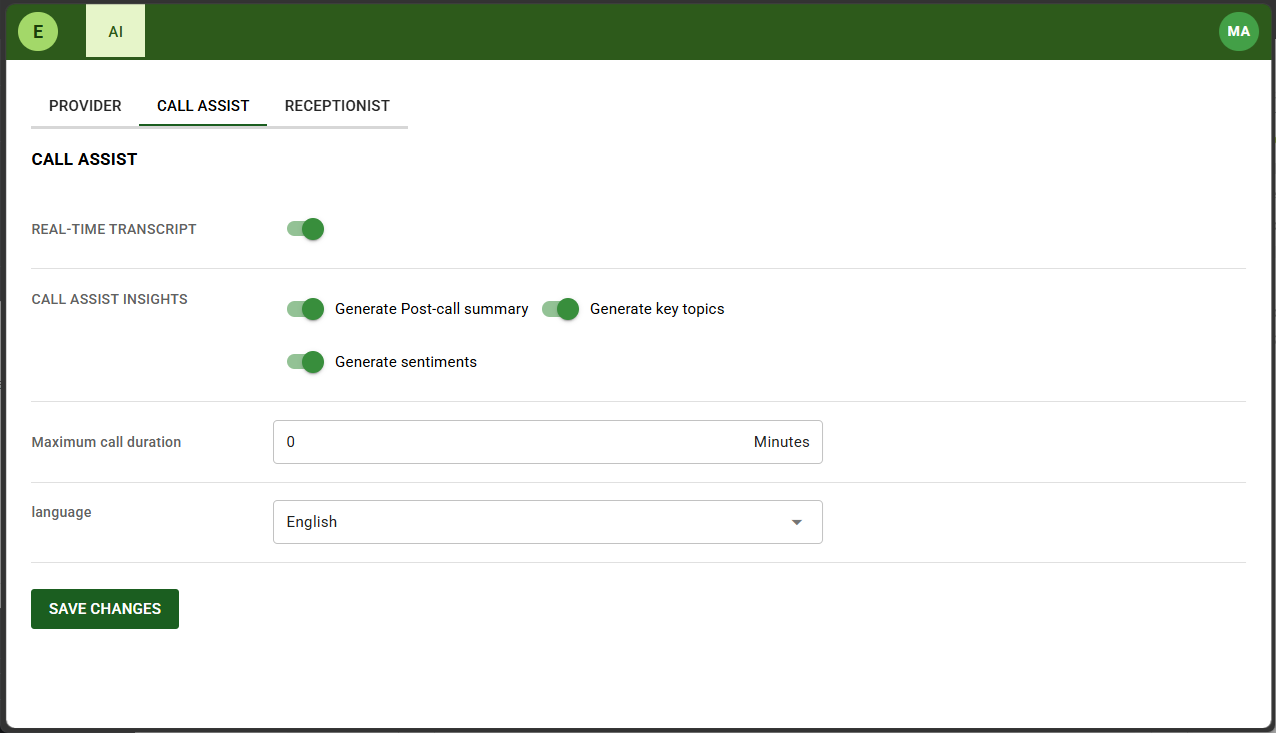
Navigate to the CALL ASSIST tab.
Toggle on Real-time Transcript.
Toggle ON/OFF the desired Call Assist Insights.
Setting Maximum call duration to 0 indicates there is no limit.
Click SAVE CHANGES.
UCX Configuration
AI Assist is configured on a per extension basis.
- Navigate to PBX – PBX Configuration page.
- From the left navigation panel, select Extensions (XSTIM).
- Select the desired extension and scroll down to the field AI Processing.
- Toggle the field to Enabled.
- Click Submit Changes.
- Click Apply Config.

Infinity Web Client Configuration
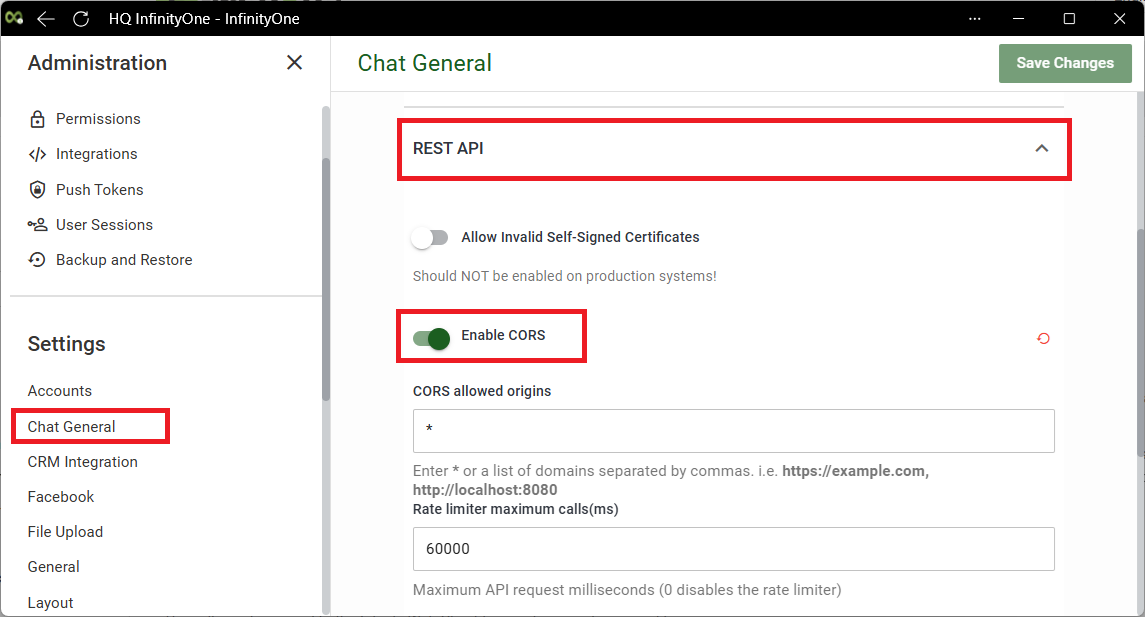
]Follow the steps below to enable CORS.
- Navigate to Administration – Chat General page.
- Expand REST API section.
- Toggle on Enable CORS.
- Click Save Changes button.
Enable soft phone and assign the extension for each user.
- See Enable Softphone.
- See Assign Extension.
AI Assist Operation
When a licensed user’s call is connected, AI Assist processing begins automatically.
During the call:
• Audio is streamed securely from UCX
• Processing occurs in approximately five-second intervals
• Transcription and sentiment data are returned to InfinityOne
When the call ends:
• Final transcript segments are processed
• Sentiment analysis is finalized
• A post-call summary is generated
• Transcript and metadata are written to UCX
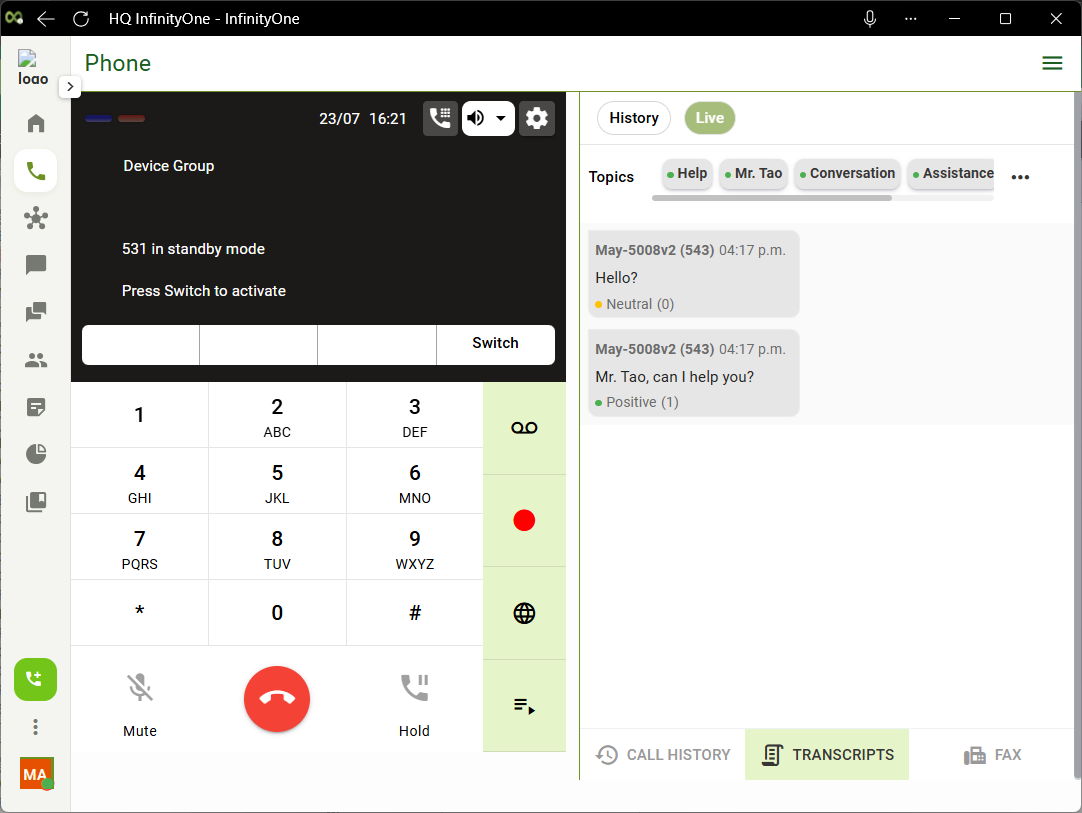
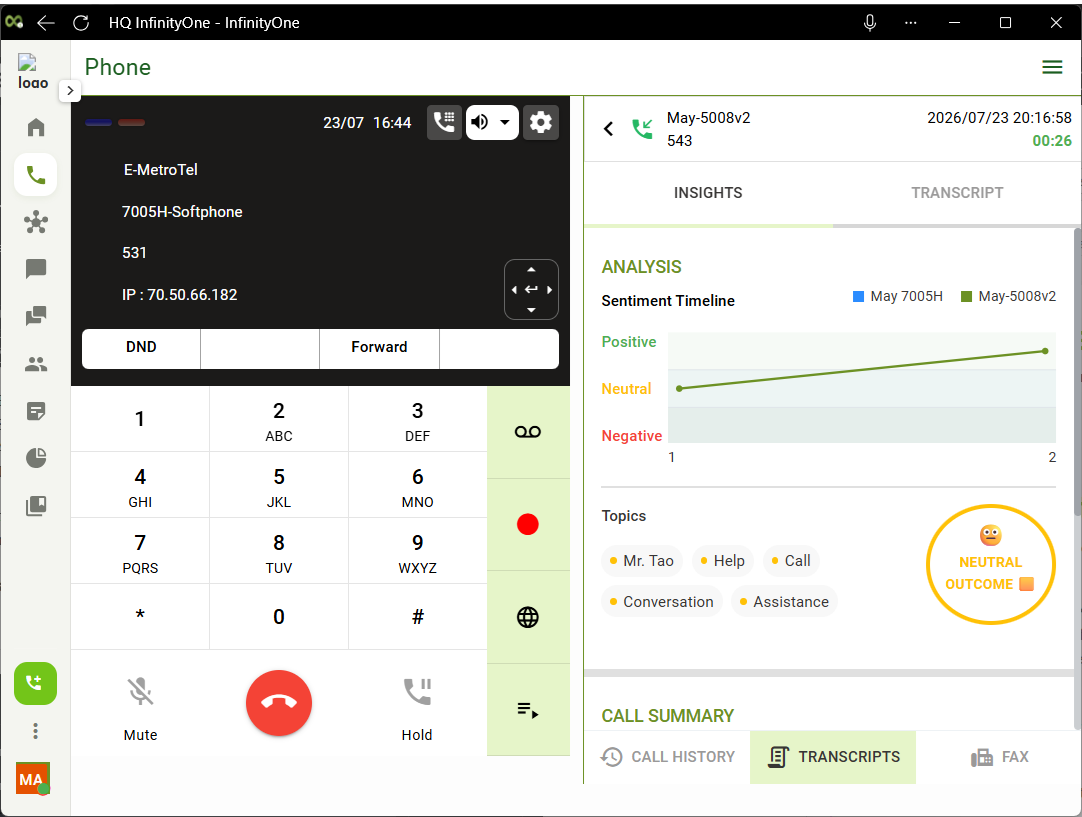
The real-time live transcription interface remains available even after the call ends, until you navigate away from the page.
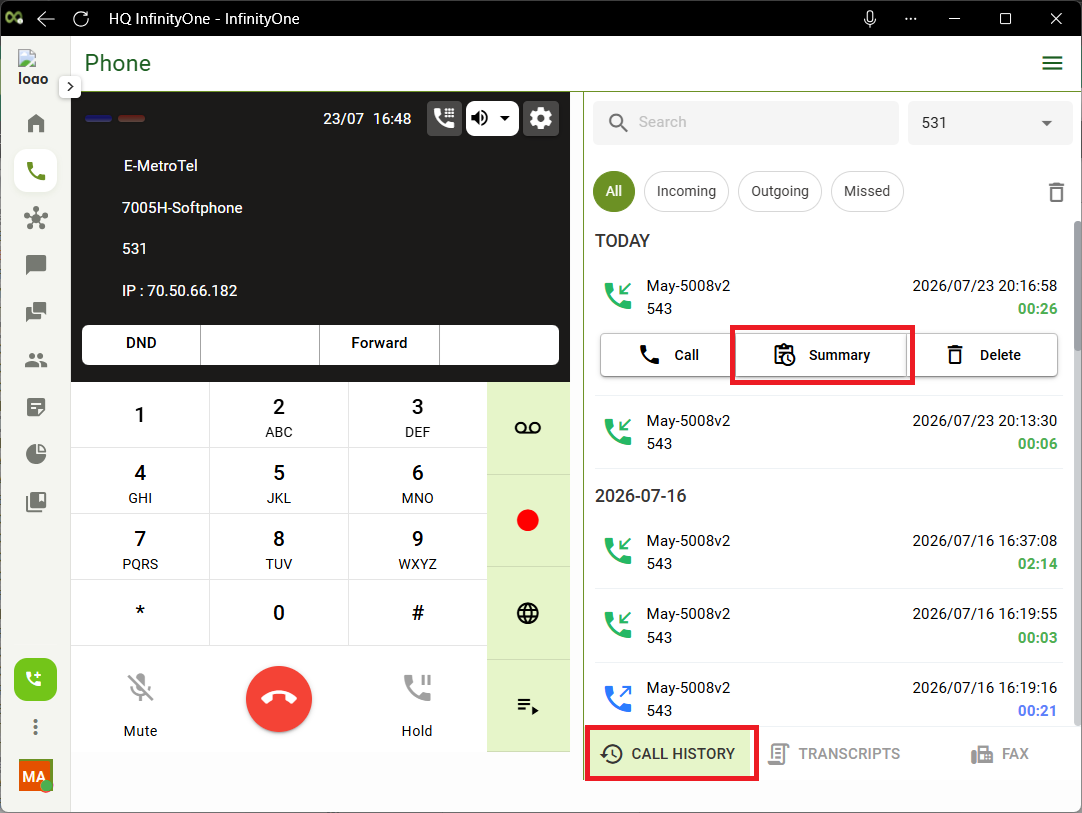
You can then retrieve the AI transcripts and insights by going to Call History, click on the desired call, then click Summary.
Failure Handling
If internet connectivity is unavailable during the call:
• AI processing will not complete
• No transcript or summary will be generated
• Core UCX call handling, including recording if enabled, remains unaffected
If connectivity is lost during an active call but the call continues, transcript data generated prior to interruption will be stored. Processing will not resume until connectivity is restored.
If connectivity loss results in the call being dropped, the call must be re-established. AI Assist processing will begin automatically when the new call is connected, and transcript data will be generated for that new call.
